
Intel AX201NGW WiFi Card – WiFi 6 & Bluetooth 5.2 Laptop Upgrade | PC Garage
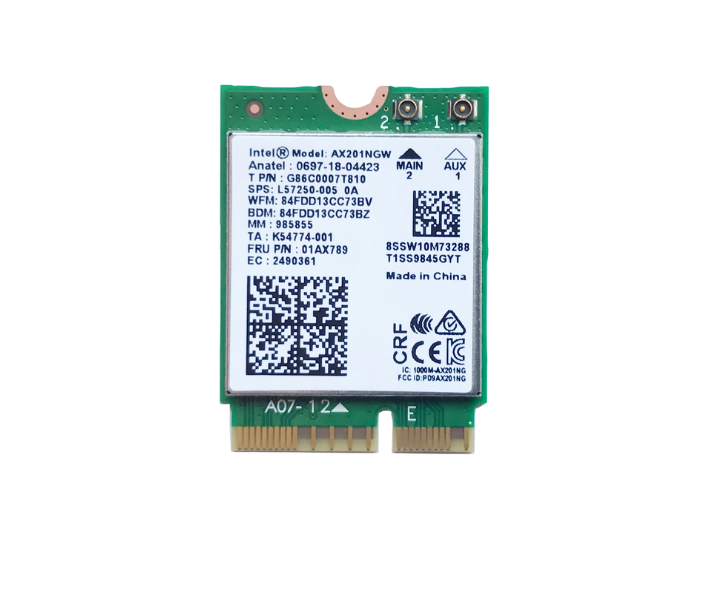


Upgrade your laptop with the Intel AX201NGW WiFi 6 & Bluetooth 5.2 card. Faster wireless speeds, improved range, and stable Bluetooth connections. Perfect replacement or upgrade for compatible laptops.
🎯 Available Payment Options:
 Cash / Bank Transfer:Rs8,550.00 (10% Discount)
 Credit / Debit Card:Rs9,025.00 (5% Discount)
 Koko Payment (3x):3 Payments of Rs3,166.67
- Delivered today (order Mon-Fri before 12:00, delivery between 17:00 and 22:00)
- excluded shipping costs, sent by PC Garage
- Pick up at a PC Garage Store possible
- Customer service 9am - 5pm
Description
Intel AX201NGW WiFi Card – WiFi 6 + Bluetooth 5.2 Upgrade for Laptops
Boost your laptop’s connectivity with the Intel AX201NGW wireless card, featuring the latest WiFi 6 technology and Bluetooth 5.2. Designed for faster speeds, lower latency, and better range, this card is an excellent upgrade for gaming, streaming, and multitasking.
Specifications:
-
Model: Intel AX201NGW
-
WiFi Standard: WiFi 6 (802.11ax)
-
Speed: Up to 2.4 Gbps (dual-band 2.4GHz & 5GHz)
-
Bluetooth Version: 5.2
-
Interface: M.2 2230 (Key E)
-
Compatibility: Windows 10/11, Linux
-
Condition: 100% Brand New
Key Features & Benefits:
-
⚡ Faster Wireless Speeds – Up to 3x faster than WiFi 5, perfect for HD streaming and gaming.
-
📶 Better Range – Improved coverage with advanced MU-MIMO and OFDMA technology.
-
🔄 Stable Bluetooth 5.2 – Lower latency and stronger connections for headphones, keyboards, and other devices.
-
💻 Easy Installation – M.2 2230 form factor fits most modern laptops.
-
🛡 Reliable Quality – Genuine Intel product for long-term performance.
Compatible Devices:
-
Works with many laptops that support M.2 Key E slot and WiFi 6.
-
Popular with Acer, Asus, Dell, HP, Lenovo, and MSI laptops. (Check your laptop’s slot type before purchase.)
Installation Tips:
-
Power off and unplug your laptop.
-
Remove the back panel to access the M.2 WiFi slot.
-
Gently replace your old card with the AX201NGW, secure with a screw, and reconnect antennas.
-
Install the latest Intel WiFi & Bluetooth drivers from the Intel website.
Recently viewed items
Reviews
There are no reviews yet.